For Audiobookshelf listeners

A better iPhone app for your Audiobookshelf library.

Connect to your own Audiobookshelf server. Stream or download books. Sync progress, organize with custom shelves, clip passages, add ambient audio, and listen offline.

Requires Audiobookshelf server v2.3.0+

Everything you need

Built for serious listeners.

Your Audiobookshelf server stays in control of the library. LAABS Audio adds the mobile experience around it.

Foundation

Connects to Audiobookshelf

Sign in to your own server. Stream from anywhere, download for offline listening, and keep your progress synced automatically.

  • Stream audiobooks directly from your server
  • Download books and cover art for local playback
  • Sync listening progress back to Audiobookshelf
  • Switch between multiple Audiobookshelf libraries
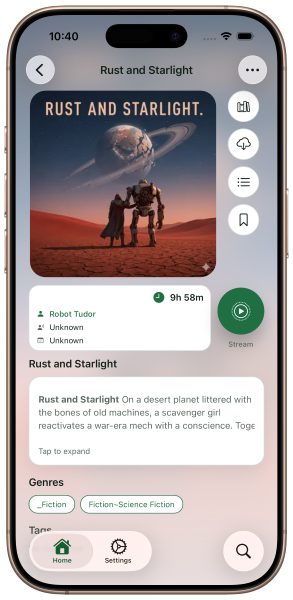
  • See clearly whether you're streaming or playing locally
Requires server v2.3.0+

Home Screen

Built around bookshelves

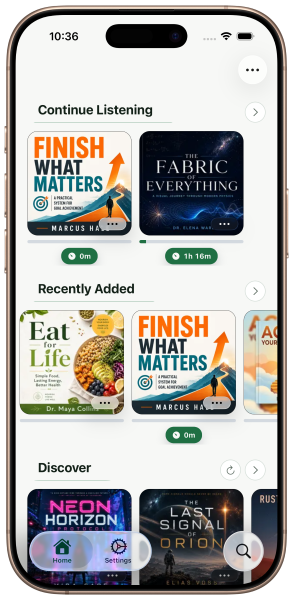
A visual home screen organized by shelves — not a flat list. The books you want are always close.

  • Continue Listening for books in progress
  • Recently Added from your Audiobookshelf library
  • Discover for a refreshed selection of unread books
  • Cover art, progress, favorites, and offline indicators

Organization

Custom shelves & playlists

Shape the Home screen around your listening life. Create shelves for bedtime reading, a long series, research, or anything else that matters to you.

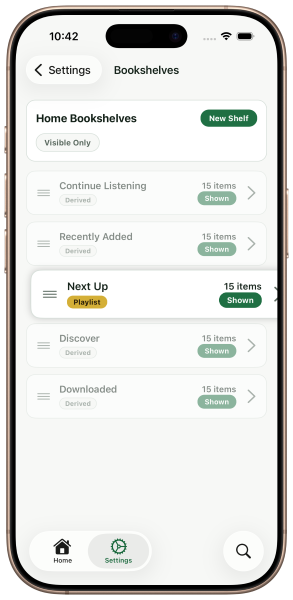
  • Show, hide, and drag shelves to reorder
  • Device-only shelves stored locally on your iPhone
  • Display Audiobookshelf playlists as Home shelves
  • Create playlist-style shelves that sync back to Audiobookshelf

Listening Intelligence

Progress that answers the useful question

Sometimes you want to know how far you've come. Other times — can you finish this on your commute? One tap switches the view.

  • Tap to toggle between time listened and time remaining
  • Designed for commutes, walks, and bedtime
  • Visible on every shelf card at a glance

Uncommon Feature

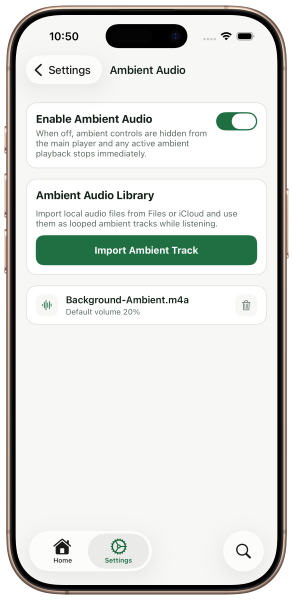
Ambient audio while you listen

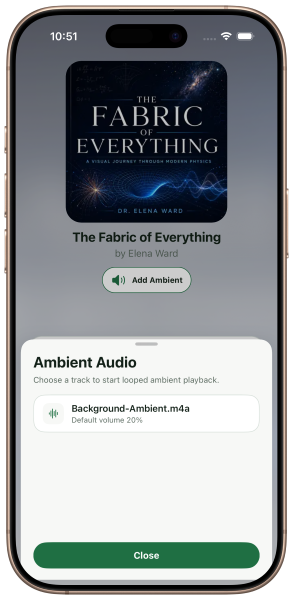
Layer rain, music, fireplace, or focus audio quietly behind the narration. Attach it to a book, control the volume independently, and let it pause with your audiobook.

  • Import any audio track as ambient background
  • Attach ambient audio to the active book
  • Independent volume control from narration
  • Pauses and resumes with your audiobook automatically
  • Great for focus, relaxation, or bedtime listening
✦ You won't find this everywhere

Annotation

Bookmarks that become audio clips

Standard bookmarks are just the start. Mark a moment, or define a range and clip up to one hour of audio from any book.

  • Point bookmarks at any position
  • Clip bookmarks with start and end range
  • Clip editor with preview controls
  • Attach local notes to any bookmark
  • Clips up to one hour long

Premium Feature — No extra cost

Export clips & transcriptions

Turn a clipped passage into a shareable audio file or a formatted text transcript. Hard to find in any other audiobook app.

  • Export clip range as M4A from downloaded books
  • Transcribe clips on supported iOS devices
  • Transcript includes book title, bookmark title, range, and text
  • Save important passages, ideas, and quotes
✦ No Subscription Needed Requires iPhone 12+ and iOS 18+

Reliability

Offline-friendly by design

Downloaded books keep playing when the network doesn't. Progress syncs automatically when you reconnect. The app is always honest about what's available.

  • Downloaded books play fully offline
  • Non-downloaded books clearly marked unavailable
  • Offline progress queued and synced on reconnect
  • Cached library data stays visible during offline sessions
The app in action

See it for yourself.

Every screen is designed around real listening workflows.

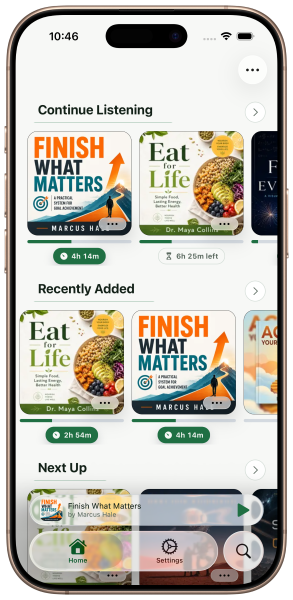
LAABS Audio home screen with custom bookshelves, cover art, and progress indicators

Home Screen

Your library, organized your way.

Visual shelves give you fast access to Continue Listening, Recently Added, Discover, and any custom shelf you create. Progress, favorites, and offline status — all visible at a glance.

LAABS Audio book detail screen showing stream or local download option

Book Detail

Stream or play locally — your choice, clearly shown.

Download a book for offline use, or stream it directly from your server. The app always tells you which mode you're in, so there's no guessing whether you're using data.

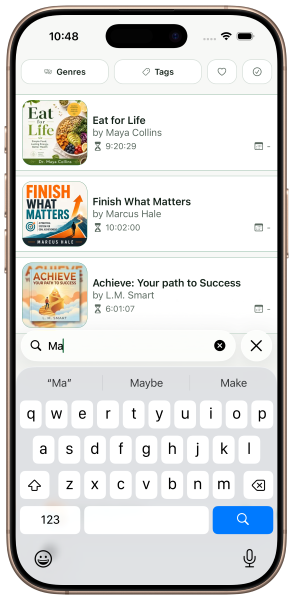
LAABS Audio search and filter interface showing genre, tag, and sort options

Search & Filter

Find what you want in a large library.

Search by title or author. Filter by genre, tag, finished status, or favorites. Sort by author, title, added date, duration, or published year.

LAABS Audio ambient audio picker in the player

Ambient Audio

Layer sound behind the narration.

Choose any ambient track — rain, music, fireplace, focus audio — and play it quietly behind your audiobook. Attach it to the book, control the volume, and let it pause with your listening session.

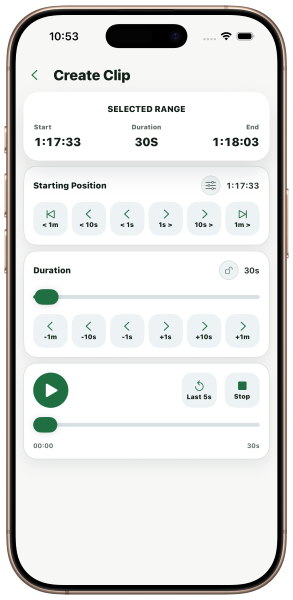
LAABS Audio clip editor showing start and end range controls

Clips & Bookmarks

Clip up to an hour of audio from any book.

Set a start and end position, lock the end, preview the range, and save. Clips become permanent bookmarks you can export, transcribe, or revisit later.

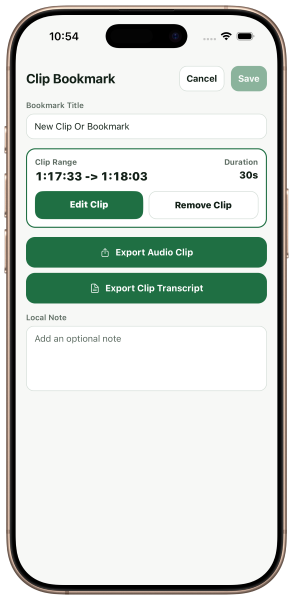
LAABS Audio clip bookmark export actions including M4A and transcript export

Export

Take a passage with you.

Export a clip as M4A audio, or transcribe it to text on supported iOS devices. Share a favourite quote. Keep a note. Turn an audiobook into something you actively work with.

More screens →

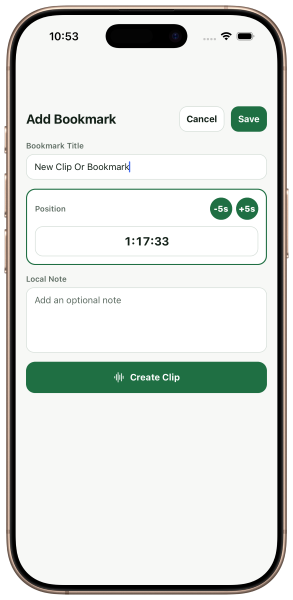
Add bookmark or create clip screen

Create bookmark or clip

Ambient audio settings screen

Ambient audio settings

Home screen with progress time toggle

Toggle: time listened ↔ time remaining

Bookshelf settings and reorder screen

Reorder your bookshelves

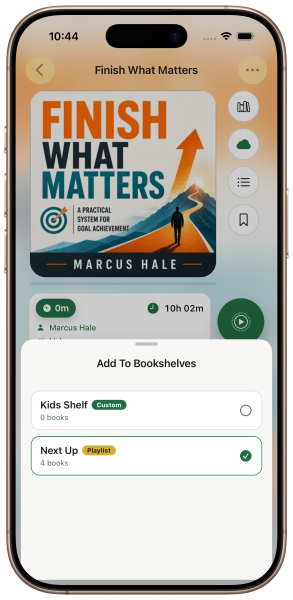
Add book to bookshelves screen

Add book to any shelf

Why LAABS Audio
"LAABS Audio is for listeners who want their Audiobookshelf server to stay in control of the library — while the mobile app makes listening, organizing, clipping, and revisiting books feel more personal."
  • A focused mobile companion to your self-hosted library

  • Stream or download from your own Audiobookshelf server

  • Organize with shelves and playlists, your way

  • Ambient audio layered behind narration — uncommon and genuinely useful

  • Clip up to an hour of audio. Export as M4A. Transcribe on-device.

  • Works offline. Syncs when you're back.

LAABS Audio app icon

Ready to listen?

LAABS Audio is available on the App Store for iPhone. Connect it to your Audiobookshelf server and start listening in minutes.

Download on the App Store

Requires Audiobookshelf server v2.3.0 or higher